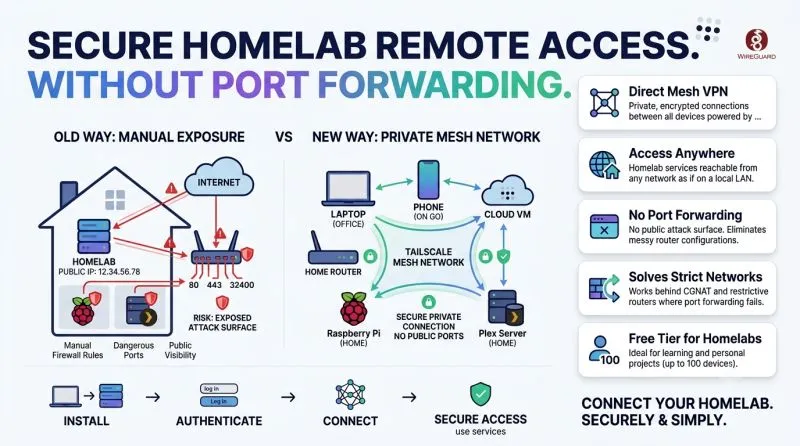
Your homelab doesn't need port forwarding. It needs Tailscale.
· 1 min read
- Tailscale
- Homelab
- WireGuard
- DevOps
- Networking
Your homelab doesn’t need a public IP, port forwarding, or a prayer that your firewall rules are correct. It just needs Tailscale.
If you’re running a homelab or learning DevOps, at some point you hit the same wall: you want to reach your Raspberry Pi, your Plex server, or your test Kubernetes cluster from outside your home network, without opening ports on your router and hoping nobody scans them first.
That’s exactly the problem Tailscale solves.
Tailscale is a mesh VPN built on WireGuard. Instead of exposing a service to the internet, you install Tailscale on every device you own, laptop, homelab server, phone, cloud VM, and they all join a private network with their own stable IPs. Your devices talk to each other directly and encrypted, no matter what network they’re physically on. No port forwarding. No dynamic DNS hacks. No public attack surface.
Why it’s great for homelab owners:
- Access your homelab from anywhere as if you were on the same LAN
- MagicDNS gives every device a clean hostname instead of memorizing IPs
- Free tier easily covers a personal homelab (up to 100 devices)
- Works behind CGNAT and strict routers where port forwarding isn’t even possible
Why it’s great if you’re learning DevOps:
- You get hands-on with real networking concepts: NAT traversal, private networking, ACLs, zero-trust access
- It’s a low-risk way to practice segmenting access before you touch production infrastructure
- Tailscale ACLs teach you to think in terms of “who can reach what,” which is exactly how real infra access control works
I’ve been using it recently to solve a very real work problem (more on that in my next post), and it completely changed how I think about exposing services. If you’re still opening ports on your router for remote access, it’s worth spending 20 minutes setting up Tailscale instead.