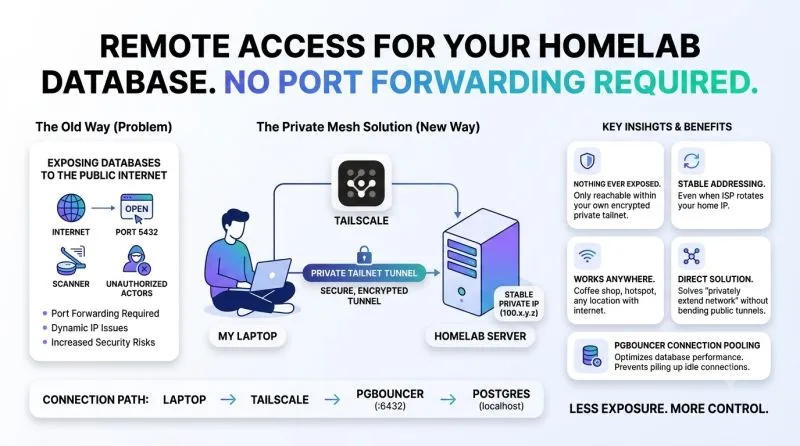
How I reach my homelab database from anywhere, without exposing it to the internet
· 1 min read
- Tailscale
- PostgreSQL
- PgBouncer
- Homelab
- Networking
I run Postgres on my homelab server. Great at home, query it, build against it, no second thought. The problem hit the first time I left the house: no port forwarding, dynamic IP, and no interest in putting a database behind an open port for anyone to scan.
I tried the obvious fixes first. ngrok’s free tier is built for HTTP tunnels, raw TCP needs the paid tier. cloudflared’s quick tunnels are HTTP-only too; carrying a database connection means a named tunnel plus a separate TCP-proxy process. Both are great tools, just not built for what I wanted: not “publish this publicly,” but “let me reach my own machine from wherever I am.”
That reframe made the answer obvious, I needed my own devices talking to each other privately, not a public endpoint. That’s Tailscale.
I installed it on my homelab server and laptop, joined both to the same tailnet, and now the server has a stable private IP (100.x.y.z) reachable from anywhere, no port forwarding, no dynamic DNS, nothing exposed on my router.
While I was in there, I added PgBouncer too: Postgres now only listens on localhost, PgBouncer (port 6432) is the sole entry point, and it pools connections so my side projects and scripts don’t pile up idle ones.
Connection path:
laptop → Tailscale → PgBouncer (:6432) → Postgres (localhost)Why it stuck:
- Nothing is ever publicly exposed, only reachable within my own encrypted tailnet
- Stable addressing, even when my ISP rotates my home IP
- Works anywhere with internet, coffee shop, hotspot, doesn’t matter
- No workaround needed, it solves “privately extend my network” directly, instead of bending a public-tunnel tool sideways
If you’re self-hosting anything you occasionally wish you could reach remotely, a private mesh network is worth setting up before you reach for a public tunnel.